
Barcode printers are widely used in logistics, manufacturing, retail, healthcare, and warehousing to produce high-quality labels and barcodes. However, even the best barcode printer can begin producing faded labels, white lines, or unreadable barcodes if the printhead is not properly maintained.
The thermal printhead is the most important and one of the most expensive consumable components inside a barcode printer. During every print job, it generates heat to create images and barcodes on labels. Over time, adhesive residue, dust, paper fibers, ribbon coating, and other contaminants accumulate on the printhead surface. If these contaminants are not removed regularly, they can reduce print quality, shorten the printhead’s service life, and eventually lead to costly replacement.
Fortunately, cleaning a barcode printer head is a quick and simple maintenance task that takes only a few minutes. With the right tools and proper cleaning technique, you can significantly improve print quality, reduce downtime, and help extend the life of your printer.
In this guide, you’ll learn:
- What a barcode printer head is and how it works
- Why regular printhead cleaning is essential
- How often you should clean your printhead
- The correct way to clean a barcode printer head without causing damage
- Common cleaning mistakes to avoid
- Answers to frequently asked questions about barcode printer head maintenance
Whether you use a Zebra, Honeywell, TSC, Datamax, SATO, Toshiba TEC, Avery Dennison, or another thermal barcode printer, the maintenance principles in this guide apply to most direct thermal and thermal transfer printers.
What Is a Barcode Printer Head?
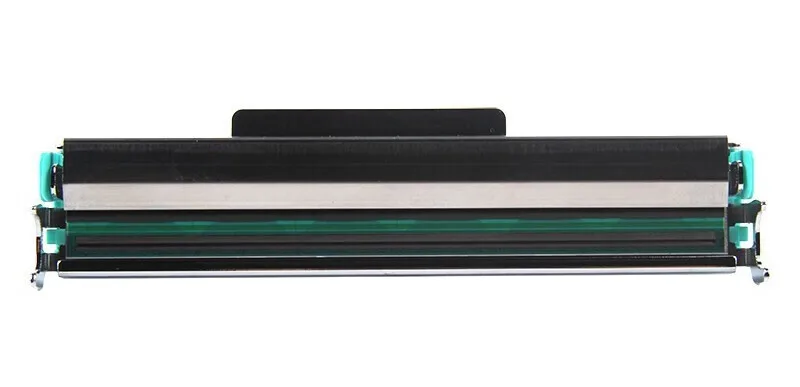
A barcode printer head, commonly called a printhead, is the core component of a thermal barcode printer. It contains hundreds of tiny heating elements arranged in a straight line. These heating elements receive electrical signals from the printer and generate heat with extremely high precision to produce text, graphics, QR codes, and barcodes.
Unlike inkjet or laser printers, thermal barcode printers do not spray ink or use toner. Instead, they rely on heat generated by the printhead to create printed images.
Depending on the printing technology, the printhead works in one of two ways.
Direct Thermal Printing
In direct thermal printing, the printhead applies heat directly to heat-sensitive labels. The label contains a special chemical coating that turns black when heated, creating the required image or barcode.
Because no ribbon is required, direct thermal printers are simple to operate and have lower operating costs. They are commonly used for shipping labels, warehouse labels, retail receipts, and other short-term applications.
However, direct thermal labels are sensitive to heat, sunlight, and abrasion, making them unsuitable for long-term identification.
Thermal Transfer Printing
Thermal transfer printing uses a ribbon positioned between the printhead and the label material.
When the printhead heats selected areas of the ribbon, the ink coating melts and transfers onto the label surface. The result is a highly durable print that resists moisture, chemicals, scratching, and fading.
Thermal transfer printing is widely used in manufacturing, healthcare, electronics, automotive, laboratory labeling, and asset tracking where long-lasting labels are required.
Key Printhead Specifications
Several factors determine the performance of a barcode printer head.
Resolution (DPI)
Printhead resolution is measured in dots per inch (DPI).
The most common resolutions include:
- 203 DPI – Suitable for shipping labels, warehouse labels, inventory management, and general barcode printing.
- 300 DPI – Produces sharper text and smaller barcodes, making it ideal for product labeling and compliance labels.
- 600 DPI – Designed for high-precision applications such as electronics, medical devices, jewelry labels, and tiny two-dimensional barcodes.
Higher resolution generally provides better print quality but may reduce maximum printing speed.
Printing Speed
Industrial barcode printers can print anywhere from approximately 50 mm/s to over 300 mm/s, depending on the printer model and print resolution.
Higher printing speeds increase productivity, but they also place greater demands on the printhead. Proper maintenance becomes even more important in high-volume production environments.
Service Life
The lifespan of a barcode printer head depends on several factors, including:
- Print volume
- Label material quality
- Ribbon quality
- Printer settings
- Cleaning frequency
- Operating environment
Regular preventive maintenance can help reduce premature wear and maintain consistent print quality throughout the printhead’s service life.
Why Is Printhead Cleaning Important?
Although the printhead is protected by a durable ceramic coating, it is still a precision component that requires regular maintenance.
Every time a label passes through the printer, microscopic contaminants gradually build up on the printhead surface. These contaminants may include:
- Dust from the surrounding environment
- Paper fibers from labels
- Adhesive residue from label backing
- Ribbon coating residue
- Dirt introduced during media loading
Even a very thin layer of contamination can interfere with heat transfer between the printhead and the label or ribbon.
As contamination increases, print quality begins to deteriorate and excessive heat can develop in localized areas of the printhead. Over time, this can permanently damage individual heating elements.
For this reason, regular cleaning is not simply a maintenance recommendation—it is one of the most effective ways to protect your investment in a barcode printer.
Benefits of Regular Printhead Cleaning
Maintain Excellent Print Quality
A clean printhead transfers heat evenly across the label, producing sharp text, dark graphics, and highly readable barcodes.
Regular cleaning helps prevent common printing problems such as:
- White horizontal lines
- Faded printing
- Missing characters
- Uneven darkness
- Poor barcode readability
This is especially important for logistics, manufacturing, and healthcare applications where barcode scanning accuracy is critical.
Extend Printhead Service Life
Contaminants increase friction and create uneven heat distribution, accelerating wear on the printhead surface.
Routine cleaning removes these contaminants before they can cause long-term damage, helping maximize the service life of the printhead and reducing the likelihood of premature replacement.
Reduce Operating Costs
Replacing a barcode printer head can be one of the most expensive maintenance costs associated with a thermal printer.
A simple cleaning routine helps reduce:
- Unnecessary printhead replacements
- Label waste caused by poor print quality
- Production downtime
- Reprinting costs
- Equipment maintenance expenses
Considering that printhead cleaning takes only a few minutes, it offers one of the highest returns on investment in barcode printer maintenance.
In the next section, we’ll look at how often you should clean your barcode printer head and the warning signs that indicate it’s time for maintenance.
Signs Your Printhead Needs Cleaning
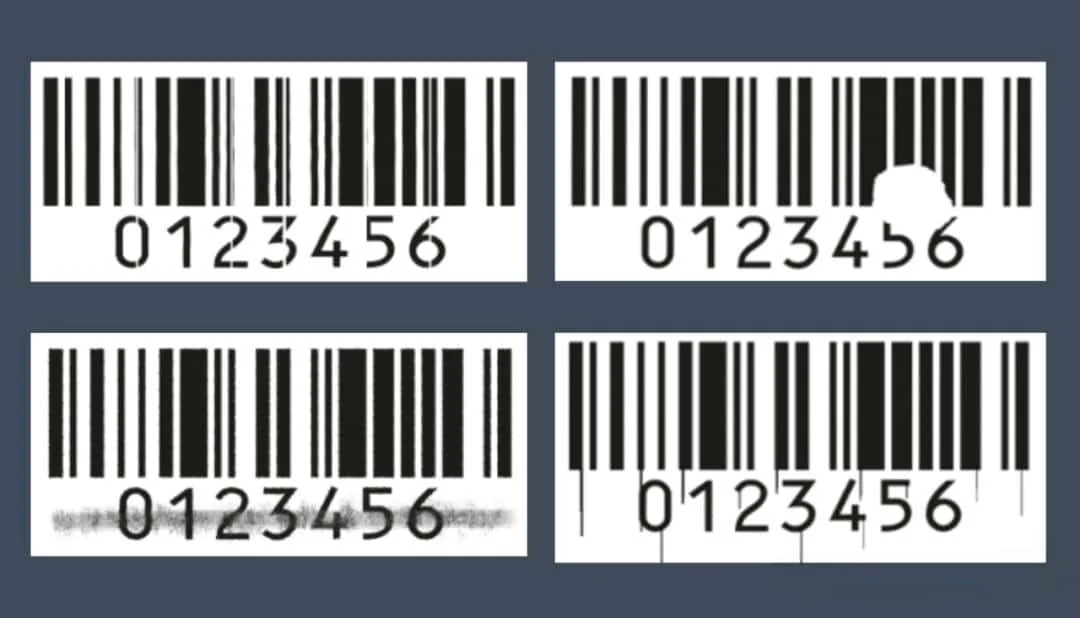
Many users only clean the printhead after print quality has become unacceptable. However, waiting until problems become severe can increase printhead wear and lead to unnecessary downtime.
Watch for these common warning signs that indicate your barcode printer head should be cleaned.
- White Lines Across Labels
One of the most common symptoms of a dirty printhead is the appearance of thin white horizontal lines across printed labels.
These lines occur when contaminants prevent individual heating elements from transferring heat evenly to the label or ribbon. If cleaning does not remove the white lines, the printhead may have damaged heating elements and require replacement.
- Faded or Uneven Printing
If your labels appear lighter than normal or have inconsistent darkness, dirt or adhesive residue on the printhead may be preventing efficient heat transfer.
Cleaning the printhead is often the first step before adjusting the printer’s darkness settings.
- Poor Barcode Readability
Dirty printheads can produce barcodes with missing bars, blurred edges, or inconsistent contrast. These defects may cause barcode scanners to fail, slowing warehouse operations and increasing shipping errors.
- Missing Characters or Graphics
Incomplete text, missing logos, or partially printed graphics often indicate that certain heating elements are unable to transfer heat properly because of contamination.
- Adhesive Build-Up
When changing labels or ribbons, inspect the printhead surface. If you notice adhesive residue, dust, or ribbon coating deposits, it’s a good time to clean the printhead before continuing production.
How Often Should You Clean Your Printhead?
Regular preventive maintenance is far more effective than waiting until print quality begins to decline.
The ideal cleaning frequency depends on your printer usage, operating environment, and the type of media you use.
As a general guideline, most printer manufacturers recommend cleaning the printhead whenever you replace consumables.
Recommended Cleaning Schedule
| Usage Scenario | Recommended Cleaning Frequency |
|---|---|
| General office use | After every ribbon roll or label roll |
| High-volume production | Daily or every shift |
| Dusty warehouse environments | More frequently as needed |
| Occasional printing | Before long print jobs if the printer has been idle |
You should also clean the printhead immediately if you notice any decline in print quality, even if your regular maintenance schedule has not yet arrived.
A few minutes of preventive maintenance can often prevent hours of troubleshooting later.
Best Tools for Cleaning a Barcode Printer Head
Using the correct cleaning tools is just as important as following the proper cleaning procedure.
Using unsuitable materials may scratch the ceramic coating or leave fibers on the printhead surface.
The following tools are recommended for safe printhead maintenance.
- Printhead Cleaning Pen
A printhead cleaning pen is one of the most convenient tools available.
It contains isopropyl alcohol in a controlled applicator, allowing you to clean the printhead quickly without using excessive liquid.
Cleaning pens are widely used by maintenance technicians because they are portable, clean, and easy to use.
- Isopropyl Alcohol (IPA)
High-purity isopropyl alcohol (99% or higher) is recommended for removing adhesive residue, ribbon deposits, and dust.
Because IPA evaporates quickly and leaves virtually no residue, it is considered the safest cleaning solution for most thermal printheads.
Avoid household cleaning products or alcohol containing perfumes, oils, or additives.
- Lint-Free Swabs
Lint-free foam swabs or polyester swabs allow precise cleaning without leaving fibers behind.
Never use ordinary cotton swabs if they shed fibers onto the printhead.
- Cleaning Cards
Printer cleaning cards are designed to clean not only the printhead but also the platen roller and paper path.
They are especially useful for removing dust and adhesive that cannot easily be reached with a cleaning pen.
How to Clean a Barcode Printer Head Without Damaging It
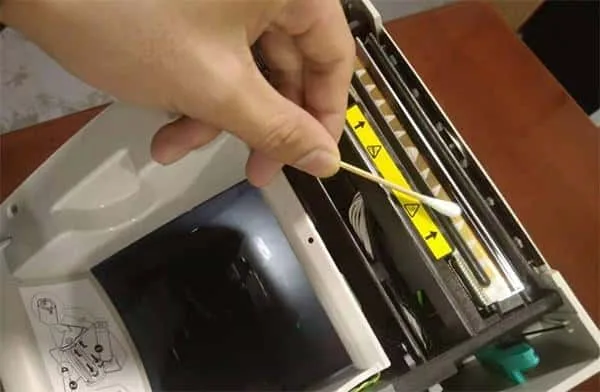
Cleaning a barcode printer head only takes a few minutes, but following the correct procedure helps prevent accidental damage.
Step 1 – Turn Off the Printer
Always power off the printer and disconnect it from the power supply before beginning maintenance.
If the printer has been operating continuously, allow the thermal printhead to cool completely before touching it.
Cleaning a hot printhead may damage its protective coating or cause the cleaning solution to evaporate too quickly.
Step 2 – Open the Printer and Remove Media
Open the printer cover.
Remove the ribbon and labels if necessary to expose the printhead.
Take a moment to inspect the printhead for dust, adhesive residue, or visible contamination.
Step 3 – Apply the Cleaning Solution
Moisten a lint-free swab or use a dedicated cleaning pen.
Do not pour alcohol directly onto the printhead.
Only a small amount of cleaning solution is required.
Step 4 – Wipe in One Direction
Gently wipe across the printhead in one smooth direction.
Avoid scrubbing back and forth repeatedly.
Do not press hard on the printhead, as excessive pressure may damage the ceramic surface or heating elements.
If heavy contamination is present, repeat the process using a clean swab rather than increasing pressure.
Step 5 – Allow the Printhead to Dry
Wait until the alcohol has completely evaporated before closing the printer and restarting operation.
Because high-purity IPA evaporates quickly, drying usually takes less than one minute.
Once dry, reinstall the ribbon and labels, close the printer, and print a test label to confirm that print quality has improved.
Pro Tips for Extending Printhead Life
Proper cleaning is only one part of printhead maintenance.
The following practices can help maximize printhead performance and reduce replacement costs.
- Use high-quality labels and ribbons to minimize adhesive and coating residue.
- Store media in a clean, dry environment to reduce dust contamination.
- Avoid touching the printhead with your fingers, as skin oils attract dirt and interfere with heat transfer.
- Use the lowest print darkness setting that still produces clear, readable barcodes.
- Replace worn platen rollers promptly to prevent uneven pressure on the printhead.
- Establish a regular preventive maintenance schedule instead of waiting for print quality problems to appear.
By combining proper cleaning techniques with good operating practices, you can significantly improve printing consistency, reduce maintenance costs, and extend the service life of your barcode printer head.
Common Mistakes When Cleaning a Printhead
Cleaning a barcode printer head is a simple maintenance task, but using the wrong method can do more harm than good. Avoid the following mistakes to protect your printhead and maintain consistent print quality.
1. Cleaning the Printhead While It Is Still Hot
After continuous printing, the printhead can become very hot. Applying cleaning solution to a hot printhead may cause the alcohol to evaporate too quickly, reducing its cleaning effectiveness. In addition, cleaning a hot printhead increases the risk of damaging its protective coating.
Always turn off the printer and allow the printhead to cool completely before cleaning.
2. Applying Too Much Pressure
The ceramic coating on a thermal printhead is durable but delicate. Pressing too hard while cleaning can scratch the surface or damage the heating elements underneath.
Always use gentle, even pressure and let the cleaning solution dissolve contaminants naturally.
3. Touching the Printhead with Your Fingers
Fingerprints leave behind oils and contaminants that attract dust and interfere with heat transfer. Even a clean hand can leave residue on the printhead surface.
Handle the printhead carefully and avoid direct contact whenever possible.
4. Using Low-Quality Alcohol
Not all alcohol is suitable for printhead cleaning.
Products containing water, perfumes, or other additives may leave residue behind or damage the printhead coating. High-purity isopropyl alcohol (99% or higher) is generally recommended for cleaning thermal printheads.
5. Scrubbing Back and Forth
Many users instinctively scrub the printhead repeatedly. However, this can increase friction and wear on the ceramic coating.
Instead, wipe gently in one direction using a lint-free swab or a printhead cleaning pen.
6. Restarting the Printer Before the Alcohol Has Evaporated
Residual cleaning solution may affect print quality or attract new contaminants if the printer is restarted too soon.
Wait until the printhead is completely dry before loading media and resuming printing.
7. Using Sharp or Metal Objects
Never use screwdrivers, blades, metal brushes, or other hard tools to remove adhesive or debris.
These objects can permanently scratch the printhead surface, resulting in irreversible damage.
8. Waiting Too Long Between Cleanings
One of the biggest mistakes is simply not cleaning the printhead often enough.
Regular preventive maintenance is much easier and less expensive than replacing a damaged printhead.
Frequently Asked Questions
1. What Causes a Dirty Printhead?
Several factors contribute to printhead contamination during normal operation.
Common sources include adhesive residue from labels, ribbon coating deposits, paper dust, airborne particles, and fibers from label materials. In dusty production environments, contaminants can accumulate even more quickly.
Using low-quality labels or ribbons may also increase residue buildup, making more frequent cleaning necessary.
Regular inspection and preventive maintenance are the best ways to keep the printhead clean and maintain consistent print quality.
2. What Are the Signs That My Printhead Needs Cleaning?
A dirty printhead usually gives clear warning signs before serious damage occurs.
You should clean the printhead if you notice:
- White horizontal lines on labels
- Faded or uneven printing
- Missing text or graphics
- Poor barcode readability
- Inconsistent print darkness
- Adhesive or dust visible on the printhead
Cleaning the printhead as soon as these symptoms appear can often restore normal print quality and prevent premature wear.
3. What Is the Best Tool for Cleaning a Barcode Printer Head?
The safest cleaning tools include:
- A dedicated printhead cleaning pen
- High-purity (99%+) isopropyl alcohol
- Lint-free foam swabs
- Printer cleaning cards
Avoid paper towels, rough cloths, household cleaning products, or abrasive materials, as they may scratch the ceramic coating or leave lint behind.
Using professional cleaning tools not only improves cleaning effectiveness but also helps protect the printhead from accidental damage.
4. What Should Never Be Used to Clean a Thermal Printhead?
Never use the following materials:
- Water
- Acetone
- Household cleaning sprays
- Abrasive cloths
- Paper towels
- Metal brushes
- Sharp tools
- Solvents that contain oils or additives
These materials can damage the protective coating, leave residue on the printhead, or shorten its service life.
When in doubt, use only high-purity isopropyl alcohol and cleaning tools specifically designed for thermal printers.
5. Why Is My Printer Still Printing Poorly After Cleaning?
If print quality does not improve after cleaning, the problem may not be contamination.
Possible causes include:
- A worn or damaged printhead
- Incorrect print darkness settings
- A damaged platen roller
- Poor-quality labels or ribbons
- Incorrect ribbon installation
- Printer calibration issues
Inspect the printer carefully after cleaning. If white lines or missing dots remain in exactly the same position on every label, the printhead may have failed and require replacement.
6. Should I Clean the Printhead After Every Ribbon Roll?
Yes. For thermal transfer printers, cleaning the printhead whenever you replace the ribbon is considered a best practice.
For direct thermal printers, many manufacturers recommend cleaning the printhead whenever a new roll of labels is installed.
This simple maintenance routine removes adhesive residue and dust before they accumulate, helping maintain consistent print quality while extending printhead life.
Conclusion
A barcode printer head is one of the most important components of any thermal printer. Keeping it clean is one of the easiest and most cost-effective ways to maintain excellent print quality, reduce equipment downtime, and extend the life of your printer.
By using the correct cleaning tools, following a regular maintenance schedule, and avoiding common cleaning mistakes, you can prevent many of the printing problems that lead to unnecessary repairs or printhead replacement.
Remember, preventive maintenance always costs less than replacing a damaged printhead.
Need a Replacement Barcode Printer Head?
If cleaning no longer restores print quality, the label printer head may have reached the end of its service life.
We supply both original and high-quality compatible barcode printer printheads for a wide range of thermal printers, including Zebra, Honeywell, TSC, Datamax, SATO, Toshiba TEC, Avery Dennison, CAB, BIXOLON, and many other leading brands.
Whether you need help identifying the correct printhead model or are looking for competitive pricing, our team is ready to assist you.
Contact us today for expert support and a fast quotation.
