
Introduction
A Zebra printhead is the most critical consumable component in a Zebra thermal barcode printer. As the part responsible for transferring heat to labels, the printhead directly affects printing quality, barcode readability, and overall printer performance.
After continuous use, Zebra printheads will gradually wear out. Common problems such as faded printing, missing lines, or poor barcode quality are usually related to printhead damage or aging.
However, replacing a Zebra printhead requires choosing the correct replacement part. Different Zebra printers use different printheads, and the DPI resolution must match the original configuration.
This complete Zebra printhead replacement guide covers:
- Signs that your Zebra printhead needs replacement
- How to choose the correct Zebra printhead
- 203dpi vs 300dpi vs 600dpi differences
- Zebra printhead part numbers by printer model
- Original vs compatible Zebra printheads
- Printhead lifespan and maintenance tips
What Is a Zebra Printhead?
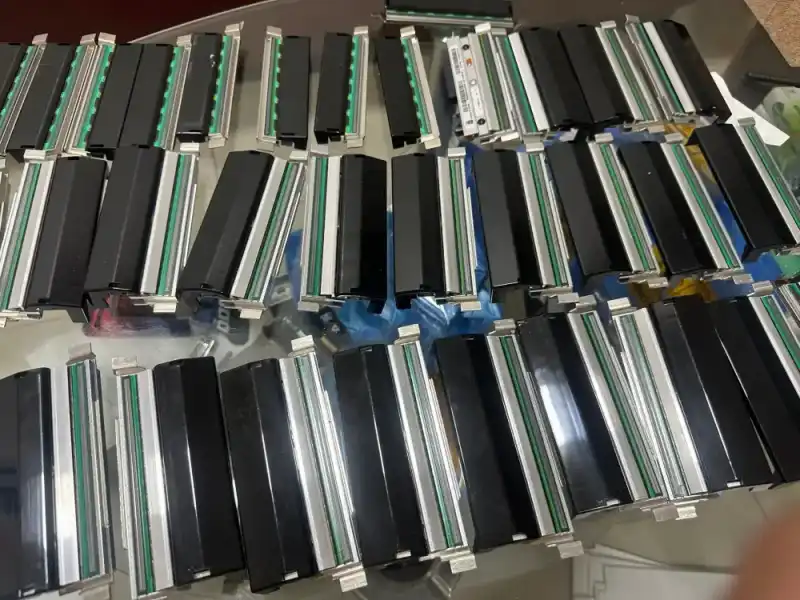
A Zebra printhead is the thermal printing component installed inside Zebra barcode printers.
It contains thousands of microscopic heating elements that generate heat to transfer images, text, and barcodes onto labels.
Because the printhead directly contacts ribbons or label materials during printing, it is considered a consumable wear part.
Zebra thermal printers mainly use two printing technologies:
Thermal Transfer Printing
Thermal transfer printing requires a ribbon.
It is commonly used for:
- Manufacturing labels
- Product identification
- Healthcare labels
- Asset tracking
- Industrial applications
Advantages:
- Long-lasting print results
- Excellent resistance to heat and chemicals
- Suitable for demanding environments
Direct Thermal Printing
Direct thermal printing does not require a ribbon.
It is commonly used for:
- Shipping labels
- Warehouse labels
- Temporary identification labels
Advantages:
- Lower operating cost
- Simple operation
Signs You Need to Replace a Zebra Printhead
Before purchasing a replacement Zebra printhead, it is important to confirm whether the printhead is actually damaged.
Common replacement signs include:
Vertical White Lines on Labels
Vertical white lines are one of the most common signs of Zebra printhead failure.
This usually happens when individual heating elements (printhead dots) are damaged.
Because damaged heating elements cannot be repaired, the printhead normally needs replacement.
Faded or Uneven Printing
If your Zebra printer produces:
- Light printing
- Uneven darkness
- Missing print areas
Possible causes include:
- Worn printhead elements
- Incorrect darkness settings
- Poor-quality ribbon
- Incorrect print pressure
Poor Barcode Quality
A damaged printhead can affect barcode readability.
If scanners cannot consistently read printed barcodes, the printhead condition should be checked.
Printing Problems Continue After Cleaning
If cleaning the printhead and adjusting printer settings cannot restore print quality, replacement may be required.
How to Choose the Right Zebra Printhead?
Choosing the correct Zebra printhead is simple.
You only need to provide one of the following two options:
Option 1: Provide Your Zebra Printer Model and DPI
If you know your printer information, please provide:
- Zebra printer model
- Printhead resolution (DPI)
Examples:
- Zebra ZT410, 300 dpi
- Zebra ZT411, 600 dpi
- Zebra ZE511, 203 dpi
Based on your printer model and DPI, we can identify the correct replacement printhead.
Option 2: Provide Your Existing Printhead Part Number
If you already have the old printhead, check the label on the printhead and provide the PN number.
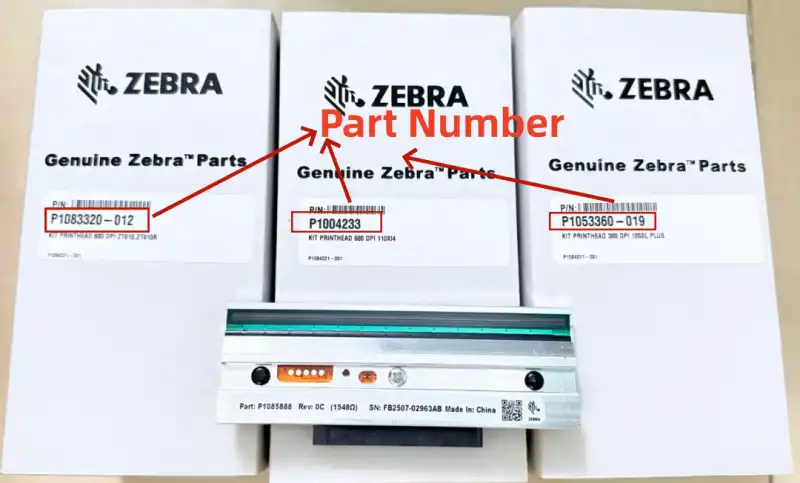
Examples:
- P1083320-012
- P1004233
- P1053360-019
The existing printhead part number is usually the fastest and most accurate way to confirm compatibility.
Need help finding the correct Zebra printhead?
Send us either:
- Your Zebra printer model + DPI
or
- Your existing printhead part number
Our technical team will help identify the correct replacement.
What Does DPI Mean?
DPI (Dots Per Inch) refers to the resolution of a Zebra printhead.
A higher DPI means more heating elements are available per inch, allowing the printer to produce smaller text, finer graphics, and more detailed barcodes.
The most common Zebra printhead resolutions are:
- 203 dpi
- 300 dpi
- 600 dpi
203 DPI vs 300 DPI vs 600 DPI Zebra Printhead Comparison
| DPI | Best For | Print Quality | Speed | Cost |
|---|---|---|---|---|
| 203 dpi | Shipping labels, warehouse labels, logistics | Standard | ★★★★★ | $ |
| 300 dpi | Product labels, manufacturing labels, small text | High | ★★★★ | $$ |
| 600 dpi | Jewelry labels, medical labels, ultra-small components | Ultra High | ★★★ | $$$$ |
Zebra Printhead Part Numbers by Printer Model
Finding the correct Zebra printhead part number is one of the most important steps before ordering.
Different Zebra printer models require different printheads. Always confirm the printer model and DPI before replacement.
Zebra ZT Series Printhead Part Numbers
| Zebra Printer Model | 203 dpi | 300 dpi | 600 dpi |
|---|---|---|---|
| ZT111 | P1123335-056 | P1123335-057 | — |
| ZT211 | P1123335-056 | P1123335-057 | — |
| ZT231 | P1123335-056 | P1123335-057 | — |
| ZT210 | P1037974-010 | P1037974-011 | — |
| ZT220 | P1037974-010 | P1037974-011 | — |
| ZT230 | P1037974-010 | P1037974-011 | — |
| ZT410 | P1058930-009 | P1058930-010 | P1058930-011 |
| ZT411 | P1058930-009 | P1058930-010 | P1058930-011 |
| ZT420 | P1058930-012 | P1058930-013 | — |
| ZT421 | P1058930-012 | P1058930-013 | — |
| ZT510 | P1083347-005 | P1083347-006 | — |
| ZT610 | P1083320-010 | P1083320-011 | P1083320-012 |
| ZT620 | P1083320-015 | P1083320-016 | — |
Zebra ZE Series Printhead Part Numbers
| Zebra Printer Model | 203 dpi | 300 dpi | 600 dpi |
|---|---|---|---|
| ZE511 | P1112750-009 | P1112750-010 | P1112750-011 |
| ZE521 | P1112750-012 | P1112750-013 | — |
Note: ZE500 series printheads may vary depending on printer width, configuration, and printhead version. Please confirm the existing PN before ordering.
Zebra Xi Series & 105SL Series Printhead Part Numbers
| Zebra Printer Model | 203 dpi | 300 dpi | 600 dpi |
|---|---|---|---|
| 105SL Plus | P1053360-018 | P1053360-019 | — |
| 105SL | G32432M (G32432-1M) | G32433M | — |
| 110Xi4 | P1004230 | P1004232 | P1004233 |
| 140Xi4 | P1004234 | — | — |
| 170Xi4 | P1004236 | P1004237 | — |
| 220Xi4 | P1004238 | P1004239 | — |
Zebra ZM, S4M & Z4M Series Printhead Part Numbers
| Zebra Printer Model | 203 dpi | 300 dpi | 600 dpi |
|---|---|---|---|
| ZM400 | 79800M | 79801M | 79802M |
| ZM600 | 79803M | 79804M | — |
| S4M | G41400M | G41401M | — |
| Z4M / Z4M Plus | G79056-1M | G79057M | — |
Can’t find your Zebra printer model? Contact our technical team with your printer model, DPI, or existing printhead part number. We’ll help you identify the correct replacement.
Original vs Compatible Zebra Printheads
When replacing a Zebra printhead, customers usually choose between original OEM printheads and compatible replacement printheads.
Original Zebra Printheads
Original Zebra printheads are manufactured according to Zebra specifications.
Advantages:
- Excellent compatibility
- Stable printing performance
- Reliable quality
- Recommended for critical applications
Suitable for:
- Medical labels
- Compliance labels
- High-volume production environments
Compatible Zebra Printheads
High-quality compatible printheads are designed to match original specifications.
A reliable compatible printhead should maintain:
- Correct electrical characteristics
- Proper resistance values
- Accurate dimensions
- Stable printing performance
Advantages:
- More competitive price
- Good cost performance
- Suitable for logistics, warehouse, and general industrial applications
For customers managing multiple printers or looking to reduce maintenance costs, compatible Zebra printheads can be an effective solution.
How Long Does a Zebra Printhead Last?
A Zebra printhead is a consumable component.
The typical lifespan is approximately:
30 km – 50 km of printing distance
Actual lifespan depends on:
- Label material quality
- Ribbon quality
- Printing speed
- Darkness settings
- Working environment
- Maintenance frequency
Proper operation and regular cleaning can significantly extend printhead life.
Factors That Affect Zebra Printhead Life
Label Quality
Poor-quality labels may contain dust or rough surfaces, increasing friction and accelerating printhead wear.
Ribbon Quality
Low-quality ribbons may damage the printhead protective coating.
The ribbon width should always be equal to or wider than the label width.
Printing Speed and Darkness
High printing speed and excessive darkness settings increase thermal stress and mechanical wear.
Static Electricity
Static discharge can permanently damage internal printhead circuits.
Improper Handling
Avoid touching the printhead surface directly.
Oil and contamination from fingers can affect printing performance.
Zebra Printhead Maintenance
Regular cleaning is essential for extending the lifespan of your Zebra printhead and maintaining consistent print quality.
For detailed cleaning instructions, read our complete guide:
How to Clean a Barcode Printer Head Without Damaging It?
Frequently Asked Questions About Zebra Printheads
How long does a Zebra printhead last?
A Zebra printhead typically lasts 30-50 km depending on usage conditions, labels, ribbons, and maintenance.
Can I install a 300 dpi printhead on a 203 dpi Zebra printer?
No. The replacement DPI should match the original printer configuration.
Can I upgrade from 203 dpi to 300 dpi?
Some Zebra printer models support different DPI options, but compatibility must be confirmed before upgrading.
How do I know my Zebra printhead part number?
The PN number is usually printed on the printhead label.
You can also identify the correct part through your printer model and DPI.
How often should I clean my Zebra printhead?
Regular cleaning is recommended, especially after replacing ribbons or when print quality decreases.
Conclusion
A Zebra printhead is a critical component that directly affects barcode printing quality and printer reliability.
Choosing the correct replacement requires matching:
- Zebra printer model
- DPI resolution
- Correct part number
Whether you need an original Zebra printhead or a high-quality compatible replacement, selecting the right printhead helps reduce downtime, improve printing performance, and control operating costs.
Need Help Finding the Correct Zebra Printhead?
Browse our complete collection of Zebra printheads or contact our technical team.
Send us your:
- Zebra printer model + DPI
or
- Existing printhead part number
We will help you find the correct replacement Zebra printhead.
