
Introduction
Is your barcode printer skipping labels, feeding extra blank labels, or printing in the wrong position?
Common symptoms include:
- The printer skips one or more labels during printing.
- The print content moves too high or too low on the label.
- Labels stop at an incorrect position.
- The printer cannot detect label gaps correctly.
These problems are common with thermal barcode printers from brands such as Zebra, TSC, Honeywell, SATO, and other manufacturers.
Many users assume that the printer itself has failed. However, in most cases, label skipping and print position problems are caused by media detection, calibration, incorrect settings, or label quality issues.
This article explains the common causes of barcode printer skipping labels and provides practical troubleshooting steps.
How Does a Barcode Printer Detect Labels?
Before troubleshooting, it is important to understand how a thermal barcode printer identifies label positions.
Most barcode printers use media sensors to detect where each label starts and ends.
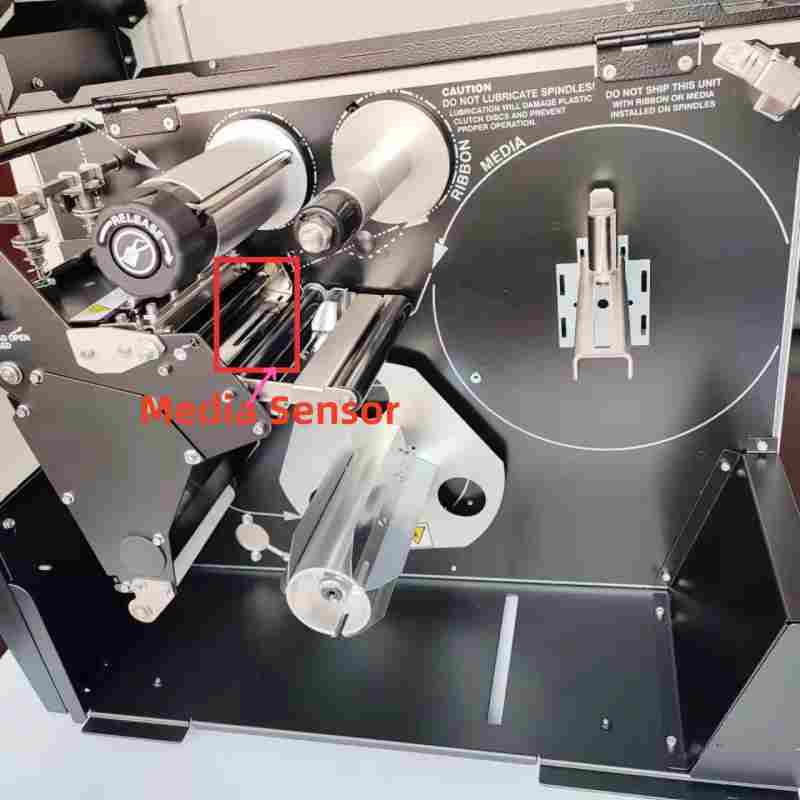
The main detection methods include:
Gap Sensor
A gap sensor detects the space between individual labels.
This is commonly used for standard die-cut labels.
Black Mark Sensor
A black mark sensor detects black marks printed on the back of the label liner.
This type of detection is often used when labels do not have visible gaps.
Continuous Media Mode
For continuous media, the printer does not detect individual labels. The print length is controlled by software settings.
If the printer cannot correctly detect the media position, it may cause:
- Skipping labels
- Incorrect print positioning
- Continuous feeding
- Printing outside the label area
1. Check Whether Labels Are Installed Correctly
Incorrect label installation is one of the most common causes of barcode printer skipping labels.
Thermal barcode printers rely on media sensors to detect label positions. If the label material does not pass through the correct sensor path, the printer cannot accurately identify each label.
Check the following:
- The label roll is installed correctly.
- The labels pass through the media sensor.
- The label guides are adjusted properly.
- The label roll is aligned correctly and does not move sideways.
After reinstalling the labels, perform media calibration before testing again.
2. Check Media Detection, Calibration, and Printer Settings
If the labels are installed correctly but the printer still skips labels or prints out of position, the next step is to check media detection and printer configuration.
Perform Media Calibration
Media calibration allows the printer to learn the characteristics of the current label material.
During calibration, the printer detects:
- Label length
- Gap distance
- Black mark position
- Sensor detection point
Calibration is recommended when:
- Installing a new label roll
- Changing label sizes
- Switching between gap labels and black mark labels
- The printer starts skipping labels or printing in the wrong position
Video Example: TSC TTP-244 Pro Label Calibration
If your printer is skipping labels or feeding blank labels, try performing a media calibration first. The video below demonstrates the calibration process on a TSC TTP-244 Pro printer.
Zebra, TSC, Honeywell, SATO, and other thermal barcode printers all use similar media detection principles. Although the calibration process and software tools may vary between models, the purpose is the same: helping the printer correctly recognize the label position.
For the exact calibration procedure, refer to your printer model’s user manual or manufacturer configuration software.
Verify Printer and Software Settings
Incorrect settings between the printer and label software can also cause positioning problems.
Check the following parameters:
Label Size
The label width and height settings in the printer driver or label software must match the actual label dimensions.
Incorrect label size settings may cause:
- Printing too high or too low
- Incorrect print position
- Labels being skipped
Media Type
Make sure the selected media type matches the actual label material:
- Gap labels
- Black mark labels
- Continuous media
Selecting the wrong media type may prevent the printer from correctly detecting labels.
Print Offset
Some barcode printers allow users to adjust print position through offset settings.
Incorrect offset values may cause printed content to move:
- Up
- Down
- Left
- Right
3. Clean the Media Sensor
A dirty media sensor is another common reason for barcode printer skipping labels.
During daily operation, the sensor may collect:
- Paper dust
- Adhesive residue
- Label debris
When the sensor becomes dirty, it may not accurately detect label gaps or black marks.
Common symptoms include:
- Printer skips labels randomly
- Calibration fails
- Printer feeds multiple labels
- Labels stop at the wrong position
How to Clean the Media Sensor
- Turn off the printer.
- Open the printer cover.
- Locate the media sensor.
- Use a soft cloth or cotton swab to gently clean the sensor.
- Remove dust and adhesive residue.
- Perform media calibration again.
Regular sensor cleaning is especially important for printers used in high-volume printing environments.
4. Check Label Quality
Sometimes the printer is working correctly, but the label material itself causes detection problems.
Thermal barcode printers require consistent label specifications to accurately detect each label.
Possible label-related issues include:
- Uneven label gaps
- Incorrect black mark position
- Inconsistent label dimensions
- Poor-quality liner material
If the printer works correctly with another label roll but has problems with a specific batch, the label material may be the cause.
Testing with a reliable label supplier can help determine whether the issue is related to the media.
5. Inspect the Label Sensor Condition
If you have already checked:
- Label installation
- Media calibration
- Printer settings
- Sensor cleaning
- Label quality
but the printer still cannot detect labels correctly, the media sensor itself may require inspection.
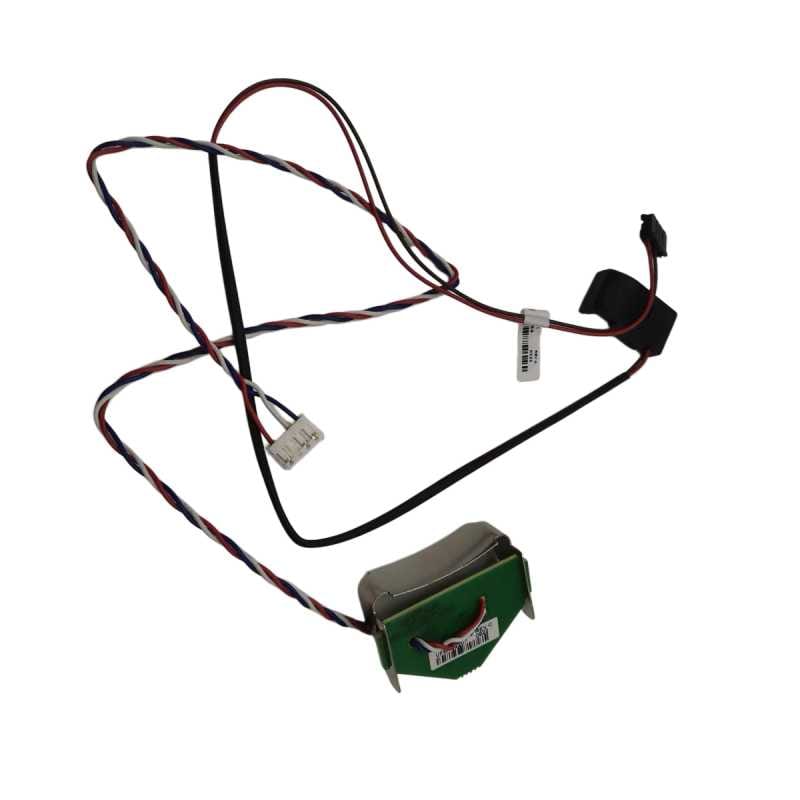
A damaged or aging label sensor may cause:
- Failure to detect label gaps
- Incorrect label positioning
- Continuous feeding
- Calibration problems
In this situation, replacing the label sensor may restore normal media detection performance.
Hansprintec supplies replacement label sensors and other barcode printer spare parts for various printer models. If you are unsure which sensor is suitable for your equipment, please contact our team for assistance.
Troubleshooting Different Barcode Printer Brands
Zebra, TSC, Honeywell, SATO, and other thermal barcode printers use similar media detection principles.
Although different models may have different menus, buttons, and configuration tools, the troubleshooting process is generally the same:
- Confirm the correct media type is selected.
- Check whether the media sensor matches the label type.
- Perform media calibration after changing labels.
- Verify label dimensions in the printer driver or label software.
- Confirm that the printer can correctly detect gaps or black marks.
Always refer to the specific printer model manual when performing calibration or changing advanced settings.
Frequently Asked Questions
Why is my barcode printer skipping labels?
The most common causes are incorrect media calibration, dirty media sensors, incorrect printer settings, or inconsistent label materials.
Why is my barcode printer printing too high or too low?
This is usually caused by incorrect calibration, incorrect label size settings, incorrect offset values, or media detection problems.
Do I need to calibrate my barcode printer after changing labels?
Yes. Different label materials may have different sizes, gaps, and sensor characteristics. Calibration helps the printer correctly detect the new media.
Why does my Zebra printer keep skipping labels?
Zebra printers may skip labels because of incorrect media settings, sensor detection problems, dirty sensors, or the need for recalibration.
Why does my TSC printer feed extra blank labels?
Extra blank labels are usually caused by incorrect media detection, calibration issues, or incorrect label settings.
Can a faulty label sensor cause label skipping?
Yes. If the media sensor cannot correctly detect gaps or black marks, the printer may skip labels or stop at the wrong position.
Conclusion
Barcode printer skipping labels and printing out of position are common problems in thermal printing applications.
In most cases, the solution is not replacing the printer. Start troubleshooting by checking:
- Label installation
- Media detection and calibration
- Printer and software settings
- Media sensor cleanliness
- Label quality
- Label sensor condition
With correct setup, calibration, and regular maintenance, Zebra, TSC, Honeywell, SATO, and other thermal barcode printers can provide stable and reliable printing performance.
If you are experiencing other thermal printing issues, such as faded printing or missing print lines, please refer to our troubleshooting guides for additional solutions.
