
When a Zebra printer displays a Head Open Error, it usually means the printer detects that the printhead assembly is not properly closed or that the head-open detection system is not working correctly.
However, this warning can appear even when the printhead looks completely closed. A loose locking mechanism, faulty sensor, or wiring problem may cause the printer to incorrectly detect its position.
So, how can you identify the actual cause? Should you adjust the printhead, check the sensor, or replace a component?
In this guide, we will explain the common causes of Zebra Printer Head Open Error and provide practical troubleshooting steps. You will also learn when component replacement may be necessary and how to avoid replacing parts that are still working properly.
1. What Does Head Open Error Mean on a Zebra Printer?
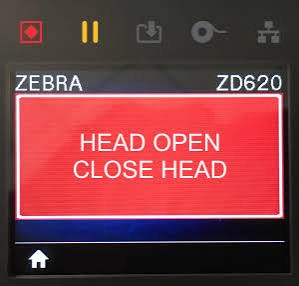
A Head Open Error indicates that the printer detects an open printhead assembly.
Zebra printers use a detection mechanism to identify whether the printhead is properly closed. The printer needs to receive the correct status signal before it can continue printing. If the expected signal is missing, the printer may stop the printing process and display a Head Open warning.
This does not necessarily mean the Zebra printhead itself is damaged.
In many cases, the problem is related to the printhead’s closing position, locking mechanism, or detection system. Therefore, checking these components should be the first step before considering a replacement.
2. What Causes Zebra Printer Head Open Error?
Several mechanical and electrical issues can trigger a Zebra Head Open Error. Understanding the possible causes will help you narrow down the problem more efficiently.
2.1 Improperly Closed Printhead
One of the simplest causes is an improperly closed printhead.
This may happen after replacing label rolls, changing ribbons, or cleaning the printer. If the printhead is not fully seated, the printer may fail to recognize its closed position.
Even a small gap can affect the detection process.
Before checking other components, make sure the printhead is completely closed and both sides are properly secured.
2.2 Loose or Damaged Locking Mechanism
The locking mechanism keeps the printhead assembly securely in position during printing.
After repeated opening and closing, some locking components may become loose, worn, or damaged. As a result, the printhead may not remain firmly in place, even if it appears to be closed.
Check for visible cracks, worn parts, loose connections, or other signs of damage around the locking structure.
If the mechanism can no longer hold the printhead securely, the affected components may need replacement.
2.3 Faulty Head Open Sensor
The Head Open Sensor is responsible for detecting whether the printhead is open or closed.
If the sensor is defective, dirty, or incorrectly positioned, it may fail to recognize the actual position of the printhead.
This explains why a Zebra printer may continue displaying Head Open even when the printhead has been properly locked.
If the mechanical structure appears normal, the sensor should be one of the next components to inspect.
2.4 Wiring or Connection Problems
The sensor needs a proper electrical connection to transmit its detection signal to the printer’s control board.
Loose connectors, damaged wires, or poor electrical contact may interrupt this communication.
When the printer cannot receive the expected signal, it may incorrectly identify the printhead as open.
If the sensor appears normal, checking its wiring and connections can help identify another possible source of the error.
3. How to Fix Zebra Printer Head Open Error
Before replacing any parts, follow these troubleshooting steps to identify the source of the problem.
3.1 Reclose the Printhead
First, turn off the printer. If it has been operating recently, allow the printhead to cool before handling it.
Open the printhead assembly and check whether any labels, ribbons, or foreign objects are preventing it from closing properly.
Remove anything that may interfere with its movement. Then close the printhead firmly and make sure the locking mechanism is fully engaged.
Restart the printer and check whether the Head Open warning disappears.
If the error remains, move on to the next step.
3.2 Inspect the Locking Mechanism
If the printhead is properly closed but the warning continues, inspect the locking mechanism.
Pay attention to the following signs:
- Loose locking parts that cannot hold the printhead securely.
- Cracks in plastic or metal components.
- Worn locking structures that no longer engage properly.
- Foreign objects preventing normal movement.
A damaged locking mechanism may prevent the printer from maintaining the correct printhead position.
If you find broken or worn components, consider replacing the affected parts with compatible replacements for your Zebra printer model.
3.3 Check the Sensor and Connections
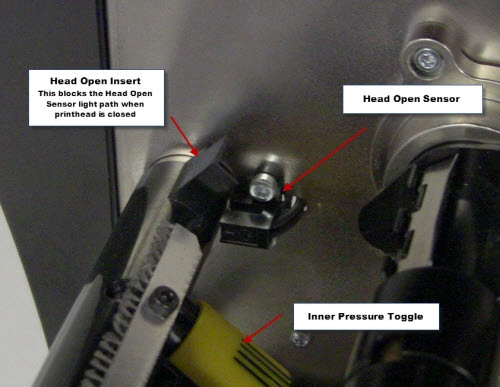
Next, inspect the Head Open Sensor and its surrounding connections.
Look for dust, dirt, incorrect sensor positioning, loose connectors, or visibly damaged wires.
Clean accessible areas carefully and make sure the connections are secure. Avoid applying excessive force to the sensor or its wiring.
If the connections appear normal but the printer still cannot detect the closed position, the sensor may require further testing.
When internal electrical inspection is necessary, follow the service instructions for your specific Zebra printer model.
3.4 Restart and Test the Printer
After completing the checks, close the printhead and turn the printer back on.
Make sure the labels and ribbon are correctly installed, then perform a test print.
If the Head Open Error disappears, the issue may have been caused by an incomplete closure or a temporary connection problem.
However, if the warning appears again, further inspection of the sensor and locking mechanism is recommended.
Repeatedly restarting the printer is unlikely to solve a problem caused by damaged hardware.
4. When Should You Replace Printer Components?
Not every Zebra Printer Head Open Error requires component replacement. The key is to determine whether the problem comes from the mechanical structure or the detection system.
Here are some signs to help narrow down the possibilities:
Possible sensor failure
The printhead closes properly, and the locking mechanism shows no obvious damage. However, the printer still cannot recognize the closed position. In this case, further sensor testing is recommended.
Possible locking mechanism damage
The printhead feels loose after closing, cannot stay securely in position, or the locking parts show visible wear or cracks. The locking assembly should be inspected.
When replacement is necessary
If inspection confirms that the sensor or locking components are damaged, replace the affected parts with components compatible with your specific Zebra printer model.
One important thing to remember: a Head Open Error does not automatically indicate printhead damage. Since this warning mainly relates to printhead position detection, replacing the printhead without checking the locking mechanism and sensor may lead to unnecessary costs.
If you are unsure whether your printhead is damaged, check out our guide on How to Tell If Your Zebra Printhead Needs Replacing — 7 Warning Signs to learn how to identify common signs of printhead failure.
5. FAQs About Zebra Printer Head Open Error
1. Why Does My Zebra Printer Say Head Open When It Is Closed?
The printer may not be detecting the correct printhead position. A loose locking mechanism, misaligned sensor, or wiring problem could cause this issue.
2. Can a Faulty Sensor Cause Head Open Error?
Yes. If the Head Open Sensor cannot correctly detect the printhead position, the printer may display this warning even when the printhead is fully closed.
3. Can I Continue Printing with a Head Open Error?
Usually, no. The printer may stop printing because it cannot confirm that the printhead is properly closed. Resolve the issue before continuing normal operation.
4. Is Head Open Error Related to Printhead Damage?
Not necessarily. This error is generally associated with the printhead locking mechanism and detection system. A damaged printhead should not be assumed without further inspection.
5. Does Restarting the Printer Clear Head Open Error?
Restarting may clear a temporary detection issue. However, if the problem comes from a faulty sensor, damaged wiring, or locking mechanism, the warning will likely return.
6. Conclusion
A Zebra Printer Head Open Error does not always indicate a serious hardware problem. Start by checking whether the printhead is fully closed, then inspect the locking mechanism, sensor, and electrical connections if necessary.
If the error continues, identifying the exact printer model is important for finding the correct replacement component.
Looking for Zebra printer replacement parts? Contact us with your printer model and the details of the problem. We can help you identify suitable components for your machine.
