
Choosing the right TSC printhead affects more than label clarity. It can also influence printer reliability, maintenance needs, and the cost of keeping equipment in service. With different printer models, resolutions, part numbers, and original or compatible options available, it is important to check the details before ordering. This guide explains how to identify the correct replacement TSC printhead, compare original and compatible products, and select an option that fits your printing tasks and operating requirements.
1. Identify Your TSC Printer Model Before Ordering
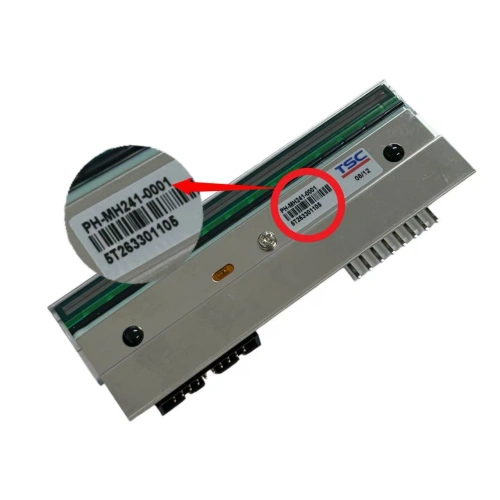
Start by confirming the printer’s complete model number. You can usually find it on the product label on the back, bottom, or side of the printer. The user manual and printer settings may also provide this information.
The TSC brand name or product-series name alone is not enough to establish printhead compatibility. Models within the same series may use different printhead assemblies or specifications, so a part that looks similar may not be interchangeable.
Check the print resolution
TSC printers use different print resolutions, commonly including 203 DPI, 300 DPI, and 600 DPI. These resolutions are not automatically interchangeable. Confirm the resolution supported by your exact printer model before choosing a replacement.
Verify the printhead part number
The printhead Part Number (PN) is one of the most useful identifiers when sourcing a replacement. Check the label on the existing printhead and compare the number with the replacement listing. Do not rely on appearance alone: two printheads may look alike but have different specifications or compatibility.
For example, two printers in the TSC MH series should not be assumed to use the same printhead just because they belong to the same series. Confirm the full printer model, required DPI, and original printhead part number. If you cannot identify the part number, send the printer model or a clear photo of the existing printhead to your supplier for a compatibility check.
2. TSC Printhead Part Numbers and Compatible Printer Models
Use the reference table below as a starting point when checking common TSC printer models, resolutions, and printhead part numbers. Always verify the details against your exact machine and existing part before placing an order.
| Model No. | DPI | Part Number |
| MA2400 | 203dpi | 98-0800022-02LF |
| MB240/MB240T | 203dpi | PH-MB240-0001 |
| MB340 | 300dpi | PH-MB240-0002 |
| MB340T | 300dpi | 98-0680012-01LF |
| ME240 | 203dpi | 98-0420005-00LF |
| ME340 | 300dpi | 98-0420005-01LF |
| MH240/MH241 | 203dpi | PH-MH241-0001 |
| MH341 | 300dpi | PH-MH241-0002 |
| ML340 | 300dpi | PH-ML240-0004 |
| MX240 | 203dpi | 98-0510090-00LF |
| MX340 | 300dpi | 98-0510090-01LF |
| MX340/MX341 | 300dpi | 98-0510090-01LF |
| MX640 | 600dpi | 98-0510090-02LF |
| PEX-1121/PEX1221 | 203dpi | PH-PEX-1001-0001 |
| TA-200 | 203dpi | 64-0330003-00LF |
| TA-210 | 203dpi | 64-0330003-00LF |
| TA-300 | 300dpi | 98-0450015-01LF |
| TDP-225 | 203dpi | 98-0390005-00 |
| TDP-244 | 203dpi | 98-0430006-00LF |
| TDP-245/TDP-247 | 203dpi | 98-0260044-10LF |
| TE200 | 203dpi | PH-TE200-0001 |
| TE300 | 300dpi | PH-TE200-0002 |
| TH240 | 203dpi | PH-TH240-0001 |
| TL240 | 203dpi | PH-TL240-0001 |
| TL340 | 300dpi | PH-TH240-0002 |
| TTP-234 Plus/TTP-243 Pro | 203dpi | 64-0010011-00LF |
| TTP-2410M Pro | 203dpi | 98-0470020-00LF |
| TTP-2410M/TTP-2410MT/MU | 203dpi | 98-0470074-00LF |
| TTP-244 | 203dpi | 64-0180002-00LF |
| TTP-244 Plus | 203dpi | 64-0180002-00LF |
| TTP-244 / TTP-244 Plus | 203dpi | 64-0180004-00LF |
| TTP-245 | 203dpi | 98-0260044-10LF |
| TTP-245 Plus | 203dpi | 98-0250128-00LF |
| TTP-246M | 203dpi | 98-0470022-00LF |
| TTP-246M Plus | 203dpi | 98-0470022-00LF |
| TTP-246M Pro | 203dpi | 98-0470022-00LF |
| TTP-247 | 203dpi | 98-0250128-30LF |
| TTP-2610MT | 203dpi | 98-0410061-00LF |
| TTP-286MT | 203dpi | 98-0350060-01LF |
| TTP-342 Pro | 300dpi | 64-0180005-00LF |
| TTP-343 Plus/TTP-345 | 300dpi | 98-0280007-10LF |
| TTP-343c | 300dpi | 98-0330019-01LF |
| TTP-344M | 300dpi | 98-0220044-00LF |
| TTP-344M Plus | 300dpi | 98-0220070-00LF |
| TTP-344M Pro | 300dpi | 98-0470023-00LF |
| TTP-345 | 300dpi | 98-0280007-10LF |
| TTP-346M Pro | 300dpi | 98-0470021-00LF |
| TTP-346MT | 300dpi | 98-0470074-01LF |
| TTP-384M | 300dpi | 98-0350032-00LF |
| TTP-644 | 600dpi | 98-0470024-00LF |
| TTP-644M Pro | 600dpi | 98-0470024-00LF |
| TTP-644MT | 600dpi | 98-0470074-02LF |
| TTP246M | 203dpi | 98-0470022-00LF |
| TX200 | 203dpi | 98-0530014-10LF |
| TX300 | 300dpi | 98-0530014-12LF |
| TX600 | 600dpi | 98-0530014-11LF |
The table is a reference, not a substitute for checking the exact printer configuration. If the model name, DPI, or part number does not match your current printhead, confirm compatibility with the supplier before ordering.
3. Original vs. Compatible TSC Printheads: What Is the Difference?
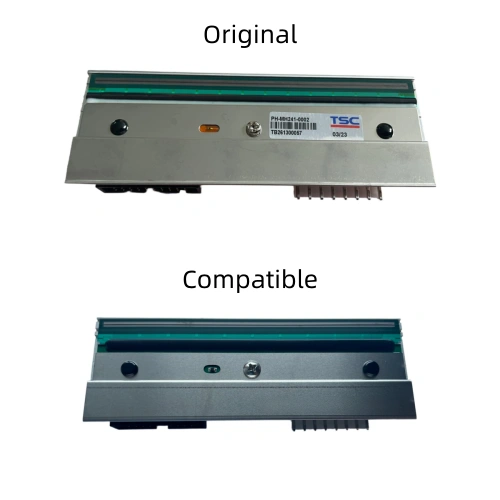
Original and compatible TSC printheads can differ in print performance, service life, purchase price, and quality-control processes. The right comparison depends on the demands of the application and the supplier behind the product.
| Comparison Factor | Original TSC Printhead | Compatible TSC Printhead |
| Print quality | Generally delivers clear detail and consistent output, with a close match to the intended printer model. | Can meet routine printing needs; fine detail and print consistency may generally be less consistent than with an original printhead. |
| Durability | Typically offers good wear resistance and is suited to long-term, high-volume printing. | Service life varies with materials and manufacturing processes; some products may show performance decline sooner. |
| Purchase price | Usually has a higher upfront price. | Usually costs less upfront, which can help reduce initial purchasing expenditure. |
| Overall cost | Higher initial investment may be offset by service life and stable output that help reduce replacement frequency and downtime. | Lower initial cost may be offset if the printhead needs more frequent replacement or print-quality issues lead to extra maintenance or downtime. |
| Quality assurance | Produced under established manufacturing standards and quality-management processes, providing corresponding quality assurance. | Quality assurance depends on the supplier’s manufacturing standards and ability to control product quality; these can vary between suppliers. |
In short, an original printhead may be a better fit when consistency and long-term operation are priorities. A compatible printhead can be a practical option when the printing task is routine and upfront budget matters. For compatible products, ask about the supplier’s quality-control process and confirm that the part matches your printer.
4. How to Choose Between Original and Compatible TSC Printheads
There is no single option for every business. Consider what you print, how often the printer runs, the available budget, and how much a printer stoppage would affect operations.
Choose based on the content you print
For product-traceability labels, electronic-component labels, or high-density barcodes, small text, fine lines, and complex codes need to remain clear and readable. An original printhead is worth prioritizing for these applications because consistent output can support reliable scanning and data capture.
For standard shipping labels, warehouse location labels, or simple product labels, a compatible printhead may be suitable if its actual output meets your requirements. Test print quality with your own label stock and barcode content where possible.
Choose based on print volume and duty cycle
Printers used for extended periods in logistics warehouses, production areas, and distribution centers often face a heavier workload. An original printhead may be preferable when stable output and durability are especially important and frequent replacement would disrupt daily work.
For occasional use—such as a small retailer printing product labels during business hours or an office printing a limited number of labels—a compatible printhead may be worth considering. Actual service life still depends on print volume, print speed, media, ribbon quality, operating conditions, and maintenance, rather than product type alone.
Balance the purchase budget with total cost
If you are replacing printheads across several TSC printers or stocking spare parts for future maintenance, compatible products may reduce initial purchasing costs. This can be helpful when the workload is routine and the budget is limited.
If original parts are a purchasing requirement, or the printer supports critical production and shipping tasks, an original printhead may better meet your operational priorities. Compare the purchase price alongside expected replacement frequency, maintenance effort, and the cost of any downtime.
Consider the impact of printer downtime
A failed printhead can delay more than label printing. It may affect order processing, packaging, or production schedules. For example, if a TSC printer on a production line prints product-identification labels, a stoppage could hold up packaging and dispatch. In this situation, prioritizing an original printhead may help reduce the risk of print-related disruption.
By contrast, if an office or small shop has a backup printer and can switch devices temporarily, the lower upfront cost of a compatible printhead may be more attractive. Assess the consequences of downtime alongside the price of the part.
5. Frequently Asked Questions About TSC Printheads
How can I find the correct TSC printhead part number?
Check the full printer model and the label on the existing printhead for its Part Number (PN), DPI, and compatible model information. If the number is not visible, consult the printer manual or ask a supplier to help verify it.
Can a TSC 203 DPI printhead be replaced with a 300 DPI printhead?
Do not assume they are interchangeable. Different resolutions may use different components or configurations. Confirm that your exact printer model supports the target resolution and verify the replacement specification before ordering.
How do I know when a TSC printhead needs to be replaced?
Common signs include persistent white lines, missing dots, faded printing, or inconsistent barcode quality. First clean the printhead and check the ribbon, labels, and print settings. If the problem remains, the printhead may need further inspection or replacement. You can also read our blog, “Thermal Printer Printing White Lines? Causes and How to Fix Them.”
How often should a TSC printhead be replaced?
There is no fixed replacement interval. Service life depends on print volume and speed, label media, ribbon quality, the operating environment, and maintenance. Check print quality regularly and consider replacement if cleaning and troubleshooting do not resolve the issue.
What should I check before buying a replacement TSC printhead?
Confirm the printer model and the printhead’s DPI or part number. Also check stock availability and warranty terms. For bulk orders, ask about pricing, lead time, and after-sales support.
How much does a TSC printhead cost?
The price depends on the model, resolution, and whether you choose an original or compatible printhead. Contact us with the part number and quantity needed for a specific quote and availability.
